Turn an AI agent into an ad-research tool: a total beginner's workflow
Point an AI agent at 100 skincare ads, pull competitor research a media buyer would pay for, then turn the script into an app you deploy on Railway.
🧪 A workdathon handout. This is the written-up version of a live build. The point isn’t this one skincare tool, it’s the pattern: you can describe a research chore in plain language and have an AI agent build it for you. Two tiers below. Tier 1 gets anyone to real insights today. Tier 2 is for turning the throwaway script into a real app. Steal whichever you need. One heads-up before you start: this needs a paid ad-library account and costs a few cents per run, and you should only research a tool you are allowed to use.
If you have never written a line of code, this article is for you. I am going to explain, with zero blind spots, how an AI agent went from “I want to study skincare ads” to a working research dashboard, and then how you would turn that throwaway script into a real app that updates itself every morning.
Every technical word gets a plain-English meaning and a real-life picture. If a step feels like magic, that’s a bug in my explanation, not something you’re missing.
Here’s what got built, so you know where we’re going:
- A crawl that pulled 100 live skincare ads from an ad library.
- Each ad labeled by its selling angle, its momentum (growing or dying), where it runs, and how much the brand likely spends.
- Each brand’s store torn apart: real price, funnel type, reviews app, upsell tricks.
- All of it in one clickable dashboard you filter and sort.
Tier 1: The workflow, with nothing hidden
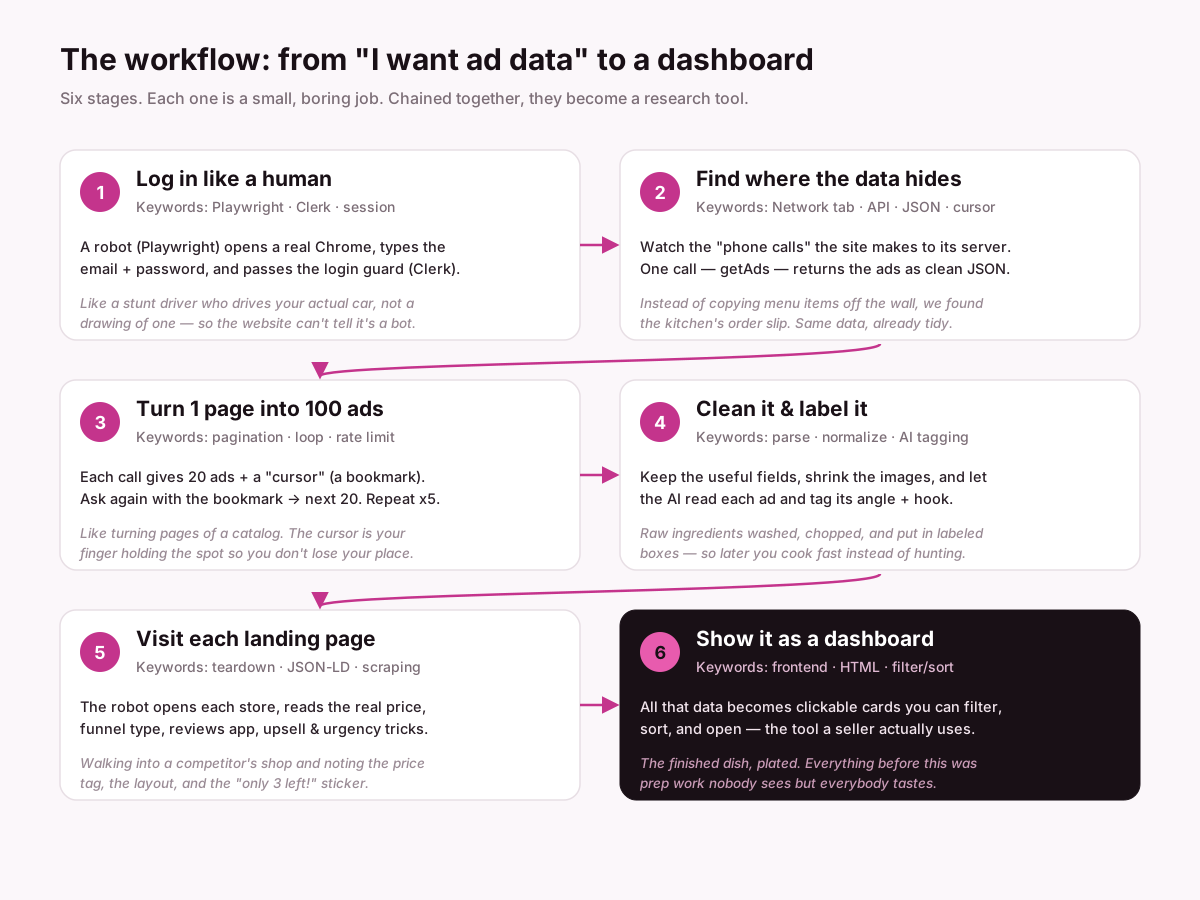
Look at the picture at the top. The entire tool is six small jobs in a chain. None of them is clever on its own. The magic is only in the chaining. Let’s walk each one and kill the “how did it even do that?” question.
Stage 1: Log in like a human
The goal: get past the login screen of the ad library (a paid tool the user already has an account for).
How it actually works. The agent uses a thing called Playwright. Picture a stunt driver who climbs into your actual car and drives it, not a toy, not a drawing, your real car. Playwright is a robot that drives a real Chrome browser: it can move the mouse, type into boxes, and click buttons exactly like a person. So it opens the login page, types the email, types the password, and clicks “Continue.”
The login was guarded by Clerk, think of Clerk as the bouncer at the door who checks your ID in two steps (first your email, then your password). The first tries failed because the agent clicked too fast, before the bouncer finished checking the first step. The fix was human-obvious: wait a beat between steps. Once it waited, the door opened.
Keyword box, Playwright: a robot that controls a real browser. Clerk: a popular login gatekeeper.
Stage 2: Find where the data actually lives
This is the step people find spooky, so here’s exactly what happened, no hand-waving.
When a website shows you a grid of ads, your browser is quietly making phone calls to the company’s server: “give me the ads,” and the server answers with a tidy list. You never see those calls, but they’re happening under the page. Every browser has a Network tab (a call log) where you can watch them.
The agent watched that call log and spotted one call named getAds. When it answered, it didn’t send back a pretty webpage, it sent back JSON, which is just data in labeled boxes, like a filled-in form:
{ "brand": "Soluna SKIN", "reach": 11308008, "price": 39, "runningDays": 886 }That’s the whole trick. Instead of screenshotting the page and trying to read pixels, we found the API, the little window the website itself uses to order data from its kitchen, and asked it the same way. Same data the site uses, already clean.
Real-life picture: copying a restaurant’s menu off a chalkboard is slow and error-prone. We found the kitchen’s order slip instead. Same information, already typed up.
Keyword box, Network tab: the browser’s log of behind-the-scenes calls. API: an “order window” a program uses to request data. JSON: data in labeled boxes (not a webpage).
Stage 3: Turn one page into a hundred ads
One call to getAds returned 20 ads and a cursor. A cursor is a bookmark. Along with the 20 ads, the server basically said, “you’ve got up to here; ask again with this bookmark and I’ll give you the next 20.”
So the agent looped: get 20, keep the bookmark, ask again, get 20 more. Five loops → 100 ads. This is called pagination, literally “turning pages.” The cursor is your finger holding your place so you don’t re-read the same page or lose your spot.
Keyword box, Pagination: fetching data page by page. Cursor: a bookmark that says “continue from here.” Rate limit: how fast a server lets you ask before it says “slow down” (so we add a small pause between calls, politeness that keeps you unblocked).
Stage 4: Clean it, shrink it, label it
Raw data is messy. This stage is the kitchen prep nobody sees.
- Keep the useful fields. Each ad came with dozens of fields; we kept the ones a seller cares about (brand, spend estimate, reach, running days, country, price) and dropped the noise.
- Shrink the images. Each ad’s thumbnail was downloaded and squeezed smaller (a tool called sharp resized them), so the final dashboard loads fast instead of being a 5-megabyte monster.
- Label the angle. Here the AI earns its keep. Half the ads had real ad copy (“This will give you the jawline you always wanted”). The AI read each one and tagged its angle, is this a before/after? a problem→solution? a mechanism explainer? a social-proof “sold out” ad? A dumb keyword filter would mislabel these; a reader that understands the sentence does not.
An honest note that became its own insight: the other half of the ads had no written copy at all, they were “catalog” ads (the platform auto-assembles them from a product feed). You can’t tag an angle from words that don’t exist. So they got labeled “Catalog / DPA,” and that gap itself is a finding: half the top skincare ads aren’t hand-written creative, they’re automated catalog ads.
Keyword box, AI tagging: letting the model read and categorize, instead of brittle keyword rules.
Stage 5: Walk into each competitor’s store
The ad library tells you a lot, but it rarely shows the real price or the funnel. So the robot (Playwright again) opened each brand’s landing page and read it.
It pulled the price from a hidden, standardized block most stores publish called JSON-LD (structured data shops include so Google can show rich results, we borrowed it). It also noted: is this a normal product page, or a long story-style advertorial that sells before it links out? Which reviews app is bolted on (Loox, Yotpo, Judge.me)? Are there upsell bundles, urgency stickers (“only 3 left”), a subscribe & save option?
That’s competitive intelligence you’d normally gather by hand, one store at a time. The robot did all of them.
Keyword box, Teardown: taking a competitor’s page apart to see how it’s built. JSON-LD: standardized hidden data on a page. Scraping: reading a webpage with a program.
Stage 6: Show it as something a human uses
All that data is useless as a spreadsheet nobody opens. The last stage turns it into a frontend, the part you see and click.
For a one-off research run, we didn’t build a server or a database. The script just wrote one self-contained HTML file: the data baked in, the thumbnails embedded, filters and sorting written in a bit of JavaScript. Open it in any browser and you have a real tool, filter by angle, sort by ad spend, click a card to see the full teardown, export the winners to a spreadsheet.
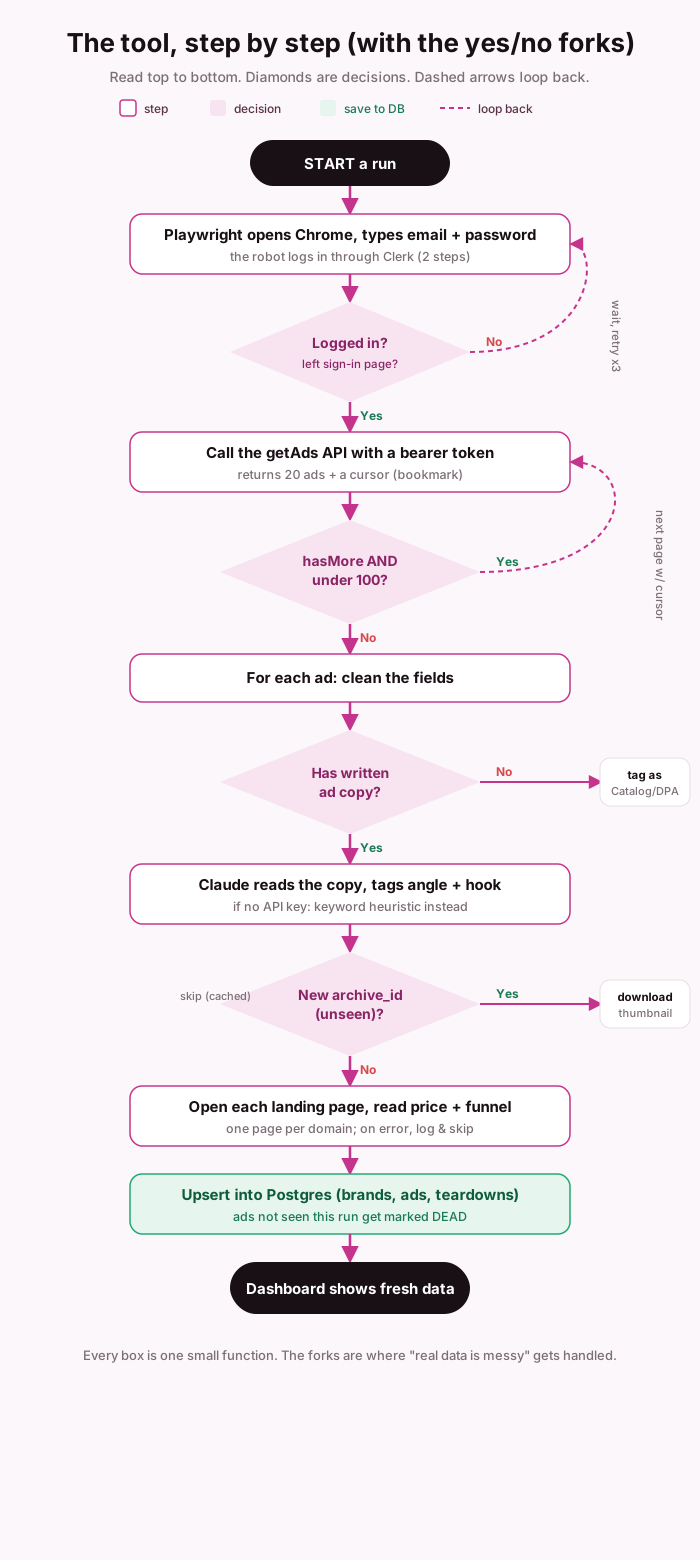
The whole workflow on one chart
Here is the same six stages drawn as a real flowchart, including the yes/no forks where “messy real data” gets handled. Read it top to bottom.
The part that actually matters: asking the right questions
A tool is only as smart as the questions behind it. Before any code, the real work was deciding what a seller needs to know when studying a wall of competitor ads. “Show me ads” is a bad brief. These are the questions that make the data worth something:
- Which products are worth testing? Signal: ads that have run for a very long time and get duplicated a lot. An ad running 886 days isn’t lucky, it’s profitable. That’s a validated product, low risk to copy.
- What angle is doing the selling? Before/after, problem→solution, mechanism, social proof. This is the most stealable thing on the page.
- Which format wins? Video, image, or catalog, where should you spend production budget?
- What’s the offer and price? And which market (currency) is it aimed at?
- Who and where? Countries, age, gender, placements, and the whitespace nobody is targeting.
- Is it scaling or dying? Never copy a fading ad. Month-over-month reach change tells you which creatives are getting more money right now.
- How fast does each brand test? Ads per month per brand, their creative velocity. If a competitor ships 20 new ads a month, one ad a month won’t compete.
Notice: none of these is technical. This is the merchant’s brain. The AI built the machine; the questions are what pointed it at something useful.
The prompts, and why the loose ones worked best
People assume a good prompt is a precise, bossy spec. In this build the opposite was true, and it’s worth studying how the requests were phrased, because it’s a skill you can copy.
These are the real prompts that drove this build (translated from casual Vietnamese, otherwise untouched). Notice they are not polished specs. That is the point.
The opening prompt:
“I want to crawl 10 skincare sales ads. Log into this site with this email and password. You can use Playwright to drive a browser and pull the data. Maybe analyze the current structure of the site, the HTML/DOM, and extract the right info, or any other way you find reasonable. What I picture is a grid of ad boxes.”
Two things stand out. It names one hard constraint (use Playwright, here is the login) and one clear picture of “done” (a grid of ad boxes). Everything in between, how to find and pull the data, is explicitly left open: “or any other way you find reasonable.” That single clause is what let the agent go find the hidden getAds API instead of clumsily screenshotting the page.
The reframe prompt:
“Now from a seller’s point of view. I want to study these ads in detail so it’s useful for my own ad campaigns. Analyze what insights a seller researching a batch of ads like this would actually need. Make an artifact with the UI/UX for the presentation, so I can evaluate before we build.”
This hands over authority on purpose: “analyze what a seller would need”, not “here is my list of 8 metrics.” That openness is exactly why the agent surfaced ideas nobody asked for, like ad velocity (how many ads a brand ships per month) and the finding that half the top ads are automated catalog ads. A bossy spec would have capped the result at the asker’s own knowledge.
The prompt that kept it honest:
“There are blind spots. For example you tell Claude to go poke into the ad library for data, but you need to explain what Claude actually did to get it, so anyone reading understands. There will be many such blind spots, so look harder.”
This one is a quality lever. Instead of accepting a hand-wavy “and then it got the data”, it forces the agent to expose its own gaps. Asking a model to show its work is how you catch the places where it was bluffing.
So the pattern across all of them:
- Give the goal and the “done” picture, not the steps. “Useful for my ad campaigns”, “a grid of ad boxes.” The why lets the agent choose good means.
- Hand over authority out loud. “any other way you find reasonable”, “you correct me or do whatever makes sense.” This is not laziness; it is leaving room for the agent to contribute what you didn’t know to ask for.
- Don’t anchor. By refusing to over-specify, you avoid anchoring the answer to your first guess. “Just list 10 ads with images” would have gotten exactly that, and nothing more.
- Invite it to expose gaps. “Explain what it actually did”, “look harder for blind spots.” Falsifiable prompts beat flattering ones.
The lesson for a workdathon: describe the destination and the constraints, then get out of the way. Over-scripting a capable agent throws away the exact thing you are paying for, its ability to see what you missed.
Keyword box, Prompt: your instruction to the AI. Anchoring: accidentally trapping the answer near your first guess. Agency: letting the agent make real decisions instead of only following orders.
Tier 2: From a throwaway script to a real app
Tier 1 gives you insight today. But that HTML file is a photograph, true this morning, stale by next week. To make it a living tool that refreshes itself, you need the rest of the restaurant: a kitchen, a pantry, and a home that never sleeps. Here’s how each piece works, still in plain language.
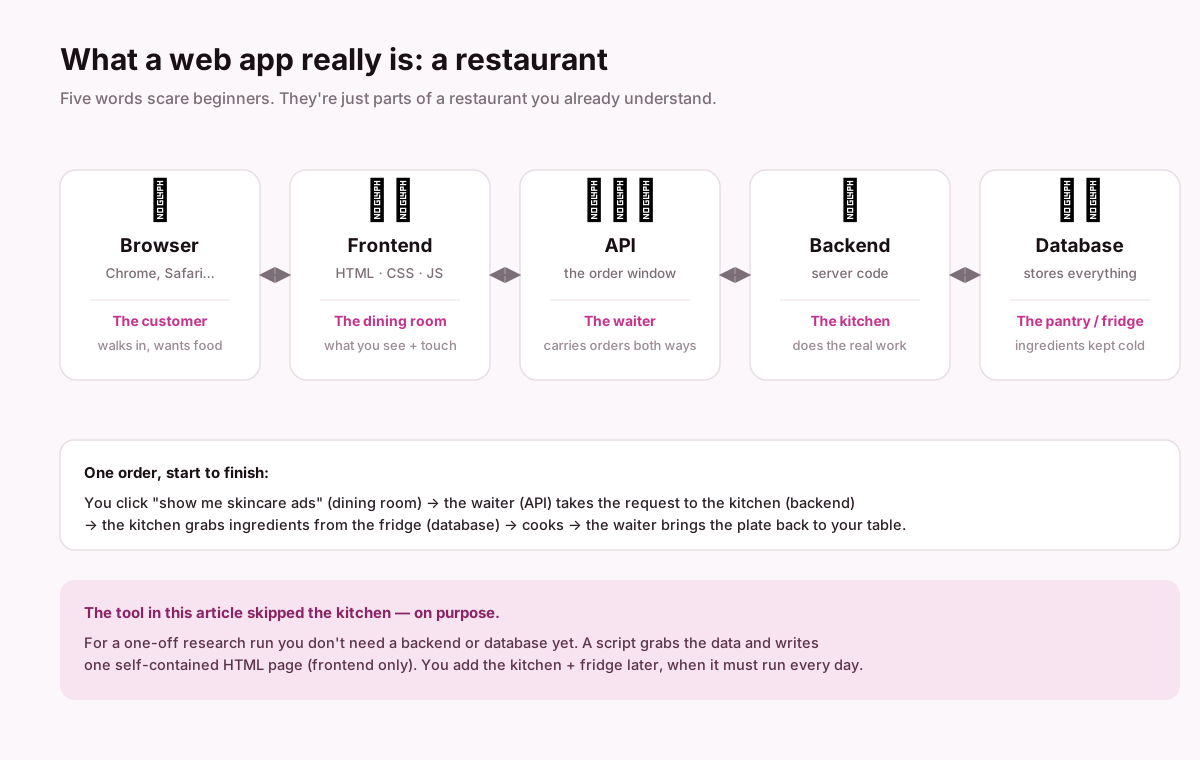
First: what “frontend,” “backend,” and “database” really mean
Go back to the restaurant picture above.
- Frontend = the dining room. What you see and touch (the buttons, the cards, the filters). Built with HTML (the structure), CSS (the paint), JavaScript (the behavior).
- Backend = the kitchen. Code that runs on a server and does the heavy work, in our case, the crawling and cleaning.
- Database = the pantry and fridge. Where you keep the ingredients (the data) between meals, cold and organized.
- API = the waiter. Carries requests from the dining room to the kitchen and brings plates back.
A one-off research run skips the kitchen and pantry, a script cooks once and plates it as a single HTML page. A daily tool needs all four.
Question 1: How do you keep the database clean?
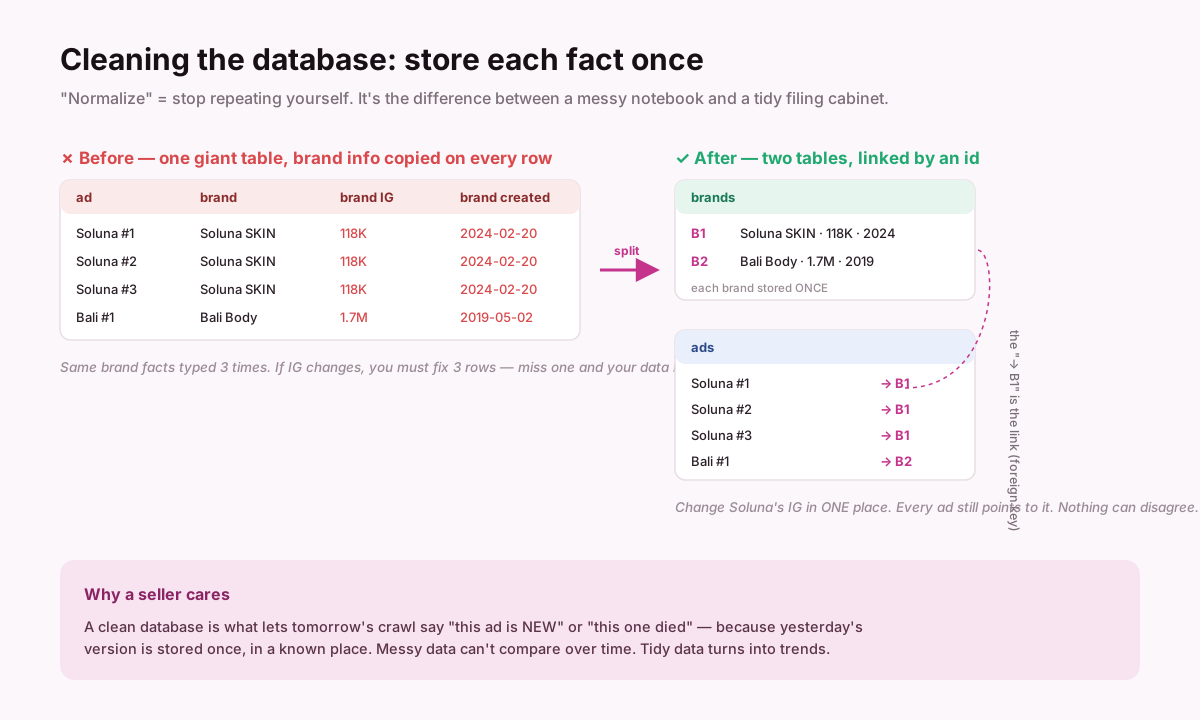
The word is normalize, and it means one thing: store each fact once. In our raw data, the brand’s Instagram count was copied onto every single ad row. If that brand ran 60 ads, its follower count was written 60 times. Change it once and 59 copies now lie.
The fix is to split it: a brands table (each brand stored once, with an id) and an ads table where each ad just points to its brand’s id. That pointer is called a foreign key, think of it as “see brand B1 for details.” Now a brand fact lives in exactly one place. Nothing can disagree with itself.
Why a seller should care: a clean database is the only thing that lets tomorrow’s crawl say “this ad is new” or “this one died”, because it can compare against a known, single copy of yesterday. Messy data can’t see change. Tidy data turns into trends.
Question 2: How do you make it stable, clean, and well-tested?
Three habits, no jargon:
- Small functions with clear names. Instead of one 500-line monster, write little pieces that each do one thing:
login(),getAds(),cleanAd(),saveToDb(). Easy to read, easy to fix. This is what “clean code” actually means day to day. - Handle the ad that breaks. Real data is dirty, a missing price, a page that won’t load. Wrap risky steps so one bad ad doesn’t crash the whole run (in our crawl, a page that timed out was skipped and logged, not fatal). This is error handling.
- Test the pieces. A test is just a tiny script that checks “if I feed in this, do I get that?” You run them after every change; if one goes red, you broke something. This is QA, quality assurance, and it’s what lets you change code next month without fear.
The mindset: assume every input will eventually be weird, and make the program fail softly and loudly, skip the bad row, write a note, keep going.
Question 3: what you need, and how the deploy actually happens
This is the part most beginners find fuzzy, so we will go slow. First, the accounts and tools. Then what Railway even is. Then the deploy, click by click. Then the things that trip people up.
Before anything: the accounts and tools, from zero
You do not need any of these to understand the tool. You need them to build and run your own. Here is the full shopping list, with what each thing is and how to get it. Tier 1 (a one-time research run on your laptop) needs only the first three. The rest are for the daily app.
| You need | What it is | How to get it |
|---|---|---|
| An ad-library account | The data source you are researching (a competitor-ad tool). | Sign up on the tool’s site; most are paid. This is the one thing the tool logs into. |
| Node.js | The engine on your computer that runs JavaScript code. | Download the “LTS” version from nodejs.org and install it, like any app. |
| A terminal | The text window where you type commands. | It is already on your computer: “Terminal” on Mac, “PowerShell” on Windows. |
| An AI coding agent | The thing that writes and runs the code for you (e.g. Claude Code). | Install it once; then you talk to it in plain language. |
| A GitHub account | Free cloud storage for code that remembers every version. | Go to github.com, click “Sign up.” Free. |
| A Railway account | The service that runs your code online 24/7 (more below). | Go to railway.app, click “Login with GitHub.” Free to start. |
| An Anthropic API key | A password that lets your app ask Claude to tag ad angles. | Create one at console.anthropic.com. Costs a few cents per run; optional (there is a keyword fallback). |
Do not let the list scare you. Signing up for each is the same “enter email, click confirm” you have done a hundred times. The only new habit is keeping the passwords and keys in a safe place, never inside your code.
What Railway actually is
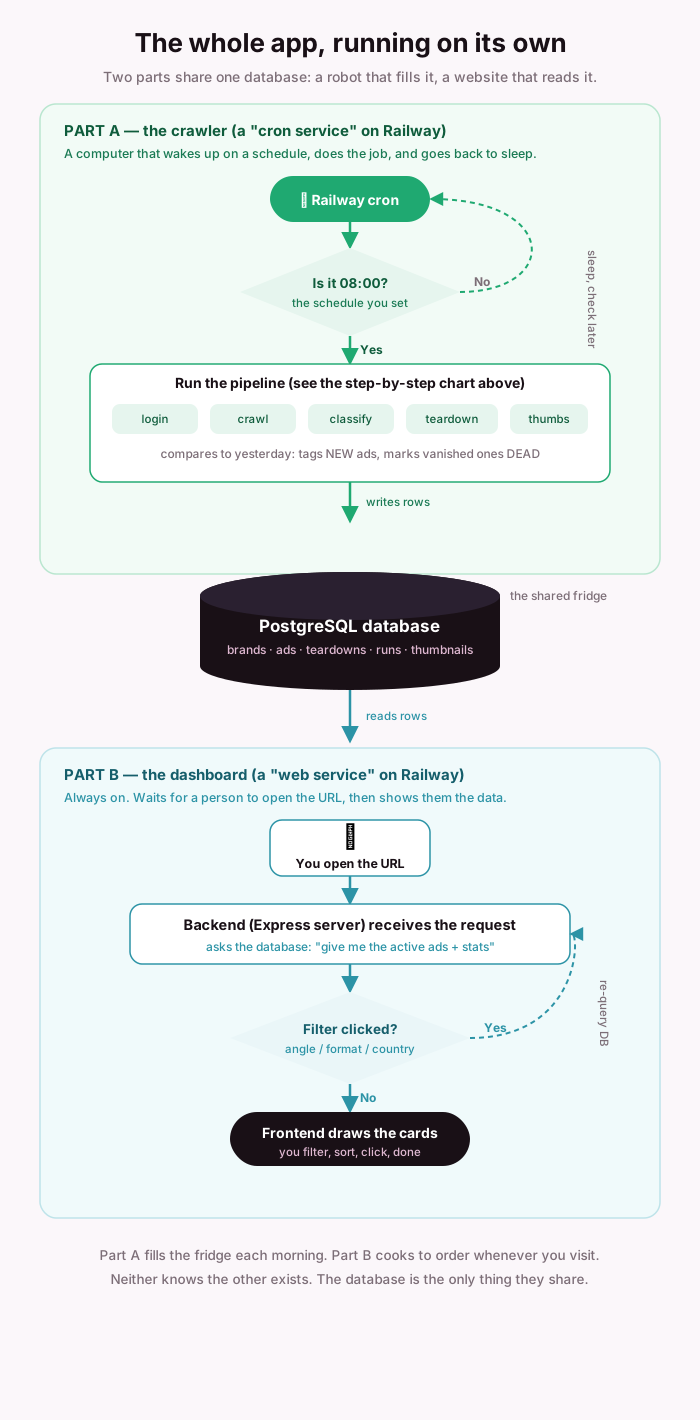
Railway is a company that rents you a computer in the cloud, one that never turns off, plus a database, plus a scheduler, all already wired together. You never touch a physical server or install an operating system. You connect your GitHub repository, and Railway runs your code on that always-on computer for you.
That is the whole idea: your laptop sleeps, Railway’s computer does not. So anything that must keep working while you are away, the daily crawler and the database, lives there. (Vercel, mentioned earlier, is the same concept tuned for websites; Railway is tuned for backends, databases, and scheduled jobs. Rule of thumb: the dining room goes on Vercel, the kitchen and fridge go on Railway.)
How the deploy happens, click by click
“Deploy” just means moving your code off your laptop onto that always-on computer and giving it a web address. Here is the actual path, nothing skipped.
- Put your code on GitHub. In your project, open the terminal and run
git init,git add .,git commit -m "first", then create a repository on github.com andgit push. A repository (“repo”) is simply your project folder, copied to the cloud, with a memory of every change. (Your AI agent can run these commands for you.) - Log in to Railway with GitHub. railway.app → “Login with GitHub.” Now Railway can see your repos. Using GitHub to log in also means you do not create yet another password.
- New Project → Deploy from GitHub repo. Pick your repo. Railway reads it, sees it is a Node.js project, installs what it needs, and starts it. That install-and-start is a build, followed by a deploy. You just ran a server without configuring one.
- Add the database. Inside the project, click New → Database → PostgreSQL. Railway creates a real database (the fridge) and quietly hands your code its address as a
DATABASE_URLvariable, so your code can find it without you copying anything. - Add your secrets as Variables. Open your service → Variables tab → add
ADLIB_EMAIL,ADLIB_PASSWORD, andANTHROPIC_API_KEY. These live here, never in the code. Same reason you do not write your PIN on your bank card. - Get a public URL (this is “access online”). Service → Settings → Networking → Generate Domain. Railway gives you an address like
your-app.up.railway.app. Open it in any browser, on any device, and there is your dashboard. That URL is “it’s online now.” - Add the daily crawler as a second service. Click New → GitHub repo and pick the same repo again. This second service will not serve the website; set its start command to
node src/pipeline.js, and under Settings → Cron Schedule give it a time. That is it: two services, one repo, one shared database.
The essence to hold onto: you are renting a computer that never sleeps, handing it your code from GitHub, keeping your passwords in a separate locked drawer, and pointing it at a schedule so it works while you don’t.
Keyword box, Deploy: move code onto an always-on computer with a public URL. Repo: your project folder, in the cloud, versioned. Build: install + prepare the code to run. Domain: the web address people open. Variable: a secret your code reads at runtime.
Question 4: turning on the daily run (cron)
A cron job is an alarm clock for code: “every day at this time, run this.” On Railway you set it as the second service’s Cron Schedule using five numbers, minute-hour-day-month-weekday. 0 1 * * * means “at minute 0 of hour 1, every day.” One catch worth knowing up front: Railway’s clock is UTC, not your local time. Vietnam is UTC+7, so 08:00 Vietnam is 0 1 * * * (01:00 UTC). Get this wrong and your crawl runs at the wrong hour, which is the single most common “why did nothing happen” surprise.
Each morning the alarm fires, the crawler logs in, pulls fresh ads, compares them to yesterday (new ads flagged, vanished ones marked dead), and writes to the shared database. The web service is already reading that database, so your dashboard is fresh without anyone touching it. That loop, alarm → crawl → compare → save → show, and again tomorrow, is what turns a one-time report into a living tool. The photograph becomes a security camera.
What might trip you up
Honest list of the bumps, so they do not stop you:
- The login gets blocked. Ad libraries defend against bots. Log in only to a tool you have a real account for, add small waits and retries (we did), and do not hammer it. If it hard-blocks automation, respect that, it is their right.
- Images go blank after a day. The thumbnail links are temporary (signed URLs that expire). Fix: download and store the images during the run, do not rely on the link later. Our app saves them into the database.
- “It worked on my laptop but not on Railway.” Almost always the browser: the crawler needs Chrome installed on the server. Fix: use the official Playwright Docker image, which already contains it (our
Dockerfiledoes this). - Database connection errors. Railway’s internal database URL needs no SSL; an external one does. Our code switches automatically based on the URL, but if you hand-configure, this is the usual culprit.
- The cron ran at the wrong time. UTC again. Convert your local time first.
- A surprise bill. The classifier calls Claude, which costs a little per run; a database and always-on service cost a little per month. Start on free tiers, watch usage, and remember the classifier has a free keyword fallback if you leave the API key out.
- Leaked secrets. Never commit your
.envfile or paste a password into the code. Put everything sensitive in Railway Variables. Add.envto.gitignoreon day one. - Terms of service. Only research a tool you are entitled to use, and keep the data for your own analysis rather than redistributing it. Being useful is not a licence to be reckless.
Keyword glossary: keep this
| Keyword | In one plain sentence |
|---|---|
| Playwright | A robot that drives a real web browser (clicks, types) like a person. |
| Clerk | A common login gatekeeper; the bouncer that checks your ID. |
| API | The order window a program uses to request data from a server. |
| JSON | Data in labeled boxes, not a webpage, just the facts. |
| Network tab | The browser’s log of the behind-the-scenes calls a page makes. |
| Pagination | Fetching data page by page instead of all at once. |
| Cursor | A bookmark that tells the server “continue from here.” |
| Rate limit | How fast a server lets you ask before it says slow down. |
| Normalize | Store each fact once, then link, no duplicated data. |
| AI tagging | Letting the model read and categorize instead of brittle keyword rules. |
| Foreign key | A pointer from one table to a row in another (“see brand B1”). |
| Scraping | Reading a webpage with a program instead of your eyes. |
| Teardown | Taking a competitor’s page apart to see how it’s built. |
| JSON-LD | Standardized hidden data a page publishes (we borrow it for price). |
| Frontend | The dining room, what you see and click (HTML, CSS, JS). |
| Backend | The kitchen, server code that does the heavy work. |
| Database | The pantry, where data is stored between runs. |
| Deploy | Move code onto an always-on computer with a public URL. |
| GitHub | Cloud storage for code that remembers every version. |
| Vercel | A host best for frontends (websites, dashboards). |
| Railway | A host best for backends, databases, and scheduled jobs. |
| Node.js | The engine on your computer that runs JavaScript code. |
| Terminal | The text window where you type commands to your computer. |
| Repository (repo) | Your project folder, copied to the cloud, versioned. |
| Build | Installing and preparing your code so it can run on a server. |
| Domain | The public web address people open (e.g. your-app.up.railway.app). |
| Variable | A private note (like a password) your code reads at runtime. |
| Cron | An alarm clock for code: “every day at 8am, do this.” |
| QA / test | A tiny script that checks the code still does what it should. |
| Prompt | Your instruction to the AI. |
| Anchoring | Accidentally trapping the AI’s answer near your first guess. |
The one thing to take home
You did not need to write code to get real ad research, you needed to ask a sharp question and let a capable agent build the boring six-stage chain behind it. Tier 1 is reachable by anyone this afternoon. Tier 2 is just adding a kitchen, a pantry, and an alarm clock so the tool keeps working while you sleep.
Point it at your own market. Ask what a good answer looks like. Then get out of the way.